Aiding the Sims or Just DRM?

When SimCity was first getting ready to launch, a lot of people were upset about the always-online bit and began to complain. By way of explaining the situation, Maxis and EA both claimed that, while yes they were on-line to prevent piracy, they were also online because the game has so many calculations that your computer can't handle them all.

For some reason, almost everyone bought this line except for those of us who program for a living and were like, "What the WHAT?"

Well, for those of you who were curious, a hacker removed the always on-line DRM from his version of the game and then posted a video showing that not only did the game work fine... it worked better, faster, and just the same.

I'm not sure if that last bit was English or not, but Click Here to Read the whole version of the article.

News and Video Pages

Hey, everybody. Because the "Registrar's Office" was starting to get junky looking, I created two new sections of the Web site dedicated solely to videos and news. Now, anytime I make an update to the site or one of the old pages, it will be listed in the "News" section and every time I make a YouTube video I'll put it under "Videos".

Hope that helps.

As such, I deleted the original SCV and Update posts and moved all of their content to these pages. Sorry for any inconvenience -- but look how clean everything is now. Hooray!

In Defense of the Small Board Size

So, I've heard a lot of people on blogs and in videos talk about how awful it is that the board sizes for SimCity 5 are so small. Frankly, it's harshing my mellow.

So, respectfully, I disagree and here's why I think it's fun to play in tight quarters.

Balance

Having a small board size adds to the fun of the game. Because you have a limited amount of space to smash all your people into, you have to make some serious choices in order to maintain the balance of your city. For instance, plopping down a pro stadium in the heart of your city is something that many of us would like to do. On a huge plot of land, you can throw the stadium anywhere there is open land and maybe you're right and maybe you're not.

But in a world that's only four screens wide, you have to agonize over where to put that stadium -- if you decide to plop it at all -- because the thing is freakin' huge! It's going to consume an entire neighborhood. But it's so sexy looking. And nevermind the money it could be bringing in.

Competition

Most people played older SimCity games to veg out. And there's nothing wrong with that. But SimCity 5 ain't no flying bird game. It's a knock-down drag out quest to reach the top of the leaderboard by climbing over the dead bodies of thousands of mayors who couldn't attract wealthy citizens to the suburbs because they don't know the power of a strategically-placed amphitheater.

Small city sites mean that when you want to partner up, you have no choice but to work together to share resources, people, and great works sites. And when you're in the mood to conquer the world all by your lonesome, they challenge your civil engineering skills and teach you that you can't just sprawl whenever the mood suits you.

This isn't 1953, you know. The world is getting smaller, people!

DRM

Stupid DRM. Yet it's there. As such, you can't have millions of people with infinitely large cities all clamoring to add miles of highway and acres of skyscrapers. Sucking water from an aquifer thirty miles away is just unrealistic.

SimCity 5 boards are small for the same reason hockey rinks are small -- if the hockey rink was bigger, there'd be less fighting. And no one wants that. The squares we've got now may seem small, but that's just one more thing you're supposed to plan for. And if you fail to respect their diminutive size, they'll become a huge problem for you later on. And that is a dark kind of fun that I personally enjoy. :)

Hardest and Easiest City Site

So, having spent four days with this game, I feel confident that I know barely a quarter of all the things that it has to offer. However, I have spent a great deal of time nursing the question: which are the best and worst cities to play in SimCity 5.

And now, I believe I have the answer.

Hardest

The worst city I could possibly imagine trying to conquer is Twain (Whitewater Valley) -- which is completely devoid of character, resources, and life. I'm pretty sure Sims test their nuclear weapons here. If you look upon it, you will immediately turn to dust. I beg you not to even consider trying this one.

Easiest

If you wanted to sit back and throw down a city without any fear of running out of resources, plenty of water, wind power plants churning out buckets of money, and plenty of friends to help push you further and further upward, the city that I would choose is Ceylon Steppes (Horizon Archipelago).

The region in which it is located is full of resources to exploit, it has no less than level two for all five resources, and the topography is mellow. It get's my seal of approval for anyone who is new to the game or just looking to veg out for an hour or twelve.

Simcity 5 Planning Mode Camera


A view from the planning camera with the regular view superimposed overtop. You'll notice a slight lens bevel effect as you look at the corners of the "regular" view.

So, there's an option in the "game settings" menu for the "planning mode camera". The purpose of this option is to allow you to pull the camera back away from your city to give you a better, wider view so you can plan better.

At first, I couldn't really make it work, but somewhere during the course of launch week they fixed it. Now, when you click on the planning mode option, you can see a significant change in the altitude of the camera.

Planning Camera and Street Level

When you have the planning camera active, it is very difficult to get down to the same eye-level as you can with a regular camera. This is most notable when you try to zoom down to see what your Sims are doing on the street. With planning camera turned on, you have to fight to get the camera to get down there and even then, you can't get as low as you can regularly.

The planning camera is meant to give you a wide-angle view for planning. If you find yourself unable to really zoom in to your city, double check your options and make sure you have "planning camera" unchecked.


This article was originally in reference to a bug in which the planning camera did not operate properly. This bug has since been fixed. Thank you/I'm sorry to all the people I tricked into coming here with my original post. It was worth it.

How to Avoid the Getting Started Tutorial

So you're all excited to play SimCity. You load it up (which takes an hour) and then you choose a server and then the game automatically loads you into a tutorial that babysteps you through the most basic SimCity game mechanics at a speed normally reserved for fetal growth.

How do you get out of it?

In the upper right-hand corner, there's a button with an elipses [...] and if you click on it, you can return to the main menu. Congratulations... no more tutorial.

12 Shortcut Hotkeys You Must Know

So, I've been playing SimCity 5 for just under 12 hours now. And the one thing that I know to be absolutely true is that this game is ten times better when you learn the shortcut keys. Not all of them mind you, but there are some clutch hotkeys that you will love me for introducing you to.

[TAB] Cycle Menus

You can flip between secondary HUDs by hitting [TAB] or [SHIFT + TAB]. This saves you tons of time and wrist action moving the mouse down to the bottom of the screen and then back to where you just were.

[I] The Straight Road Tool

If you're setting up a grid-based city, then you only need to set it to straight roads once. However, if you're like me and you're constantly switching back and forth between straight and curved lines, the [I] key is incredibly handy.

[J] The Arc Road Tool

See above, but the converse. I don't use the curvy road tool because it's too unpredictable. I've learned the quirks of the arc road tool and I use it to great effect.

[3] Cheetah Speed

Instantly flip to ultra-supersonic speed when you need to wait and earn some cash.

[~] Pause Speed

There's no real reason to use the other speeds. Fast gets you money and then when you want to stop making money and start spending it, you just tap the tilde key.

[4] Water Map

Not all of the maps have shortcut keys. That should tell you about how important the water map is. If you've been reading this blog at all, then you know how often I'm in the water map checking for dry spots and pollution.

[ALT] The Grid!

The "grid" is the term Origin uses for it's guideline game mechanic. Basically, as you draw streets, your grid will update and give you a guideline that allows you to evenly space your streets apart. However, sometimes the grid interferes with your plans for world domination. During those times, hold down [ALT] and the guidelines will disappear.

[SHIFT] Constrain/Snap

Every straight road I lay, I use the [SHIFT] key to make sure that it snaps to the guideline so that there's no confusion later.

[R] Upgrade Road

Got a dirt road, but want a high-density thoroughfare? Use the upgrade road tool just by hitting [R] and you'll never have to three-click to get denser traffic again.

[B] Bulldoze

Wipe out abandoned buildings and rubble with ease. Just a tap of the [B] and you'll clear away unsightly debris and rehab whole neighborhoods with ease.

[CTRL + U] Unzone

So you wipe out a building and within seconds it regrows. Not bad. Except, what you actually wanted was to rezone the area. Now you have to bulldoze a second time. This shortcut allows you to unzone that which you just bulldozed so it doesn't respawn.

[CTRL + Right Click] Box Zone

When zoning, if you hold down control, it will highlight the entire roadway -- including around corners if it's a box-shaped area -- and allow you to zone incredibly quickly. If you didn't know about this one, you're going to love me after this.

SimCity 501: Heroes and Villains Expansion

With the pre-order of SimCity 5, I also received the Heroes and Villains expansion pack. This bonus includes two extra buildings in the police HUD. The first building is the home of the hero MaxisMan -- Maxis Manor.

The second is the corporate headquarters of the notorious Dr. Vu -- Vu Tower.

This feature adds a little spice to the game. In between zoning and plopping ploppables, you can watch MaxisMan and Dr. Vu do battle for the fate of your city. Vu generates extra criminals who wonder your streets causing havoc and MaxisMan whoops their butts.

Maxis Manor

Every superhero needs a base of operations. This trendy little pad is a cross between Wayne Manor and Superman's solitude house -- without all the ice.

Extensions include a helipad for your floating space car and a garage for your street car. I know: a house with only two cars? What is this, 1972?

Vu Tower

There's just something about supervillains -- no personality, grumpy as all get out... yet somehow, loaded with tons of cash. Vu's Tower puts me in mind of the Green Goblin's day job.

Vu has a special laboratory that you can add onto the main building that allows him to build various nefarious laborious devices. For the photo above, I plopped it on top of the humungous freakin' three-story garage that may or may not be the home to several Macy's parade floats.

SimCity 499: Game Settings

Since even Maxis has failed to provide a comprehensive list of what each of their gameplay settings do outside of the game, I've decided to handle it.

Options Menu

  • Settings
    This is where you can change how the game looks and plays.
  • Game Manual
    This opens up a browser to Maxis' online game manual -- which you can see here.
  • Help Center
    This links you to the Origin help center that comes with the Origin game client. If you disable the help center in your Origin game client, you'll get a "this service has been disabled" message when you click on this button.
  • Getting Started
    This will allow you to replay the Summer Shoals tutorial city site.
  • Credits
    A list of people who helped make the game.
  • Return to Main Menu
    When in game, this will return you to the front menu screen where you can choose a saved game file, start a new game, or check the leaderboard.
  • Quit SimCity
    Exits the game.

Settings - Graphics

The graphics settings allow you to change how SimCity 5 looks on your monitor. Since all computers are different -- some are old, some are new, some have crappy graphics cards, some don't -- you have several options that you can fiddle with to give you a better looking game. As a general rule of thumb, if your computer is old or you have a cheap graphics card cause you're not a professional gamer, less is more -- meaning when you set everything to "less" you'll get a more fluid game.

  • Screen Resolution
    This option allows you to increase the number of pixels you can see on the screen. The higher the numbers, the more you can see. However, if your graphics card is older and incapable of handling the setting, the game could jump or crash entirely. If you have performance issues, consider jacking this setting down a notch. Also, your monitor has a certain frequency that it is tuned to (expressed in hz). The frequency you choose in the game should match that of your monitor or you may have problems.
    • 1024x768 (60, 70, and 75hz)
    • 1152x864 (60 and 75hz)
    • 1280x720 (60 and 75hz)
    • 1280x768 (60 and 75hz)
    • 1280x800 (60 and 75hz)
    • 1280x960 (60 and 75hz)
    • 1280x1024 (60 and 75hz)
  • Fullscreen (checkbox)
    Determines whether the game plays in a moveable window or enlarges to consume your entire screen.
  • Lighting
    Increases or reduces the overall quality of light used in the game. Imagine that three lights were turned on at the same time in the room in which you are sitting. Each light would cast it's rays onto your body. Reducing or increases the "lighting" option changes the number of lights that are used by the game. Low will give you just one light (the overall ambient light) while ultra will calculate every light from every object, how they bounce off things, and where they all land. The higher this setting, the more calculations must be made by your graphics card.
  • Textures
    Imagine someone you know is wearing a shirt. From far away, you can see that the shirt is red, but up close you can see that it has a little alligator and that the fabric appears to be some type of hemp. Texture is all about details. If you want to know what brand of clothing your Sims are wearing or read license plates -- you can't actually do either of these things in the game, I'm extrapolating -- then jack up the textures. Just know that the more texture you have in a scene, the slower it's going to be. If your graphics card is old or weak, stick with low textures so you don't grind your game to a halt.
  • Shadows
    Every light that strikes a building theoretically casts a shadow on the other side. That's elementary school stuff. But if three lights strike a building -- there should be three shadows. However, drawing all three shadows requires a lot of graphics, so if you don't care about maintaining true shadow casting, turn this one down so buildings only cast one main shadow. This is the only graphics option that you can turn off completely if you don't care about shadows at all.
  • Geometry
    Everything in the game has a particular shape. The more complex the shapes, the slower the game runs. You can increase or decrease the amount of geometry in the game using this option -- turning your buildings and people into simple cubes or marvelous replicas of anatomy and architecture. Sometimes, people like low geometry and high textures; other people like the reverse. Keeping them both high requires a really good graphics card.
  • Animation Detail
    Determines how much of your city is moving. Each Sim and car and house fire requires a certain amount of computer power to animate. Higher animation detail will add more moving Sims and cars and windy trees and make all their movements more fluid. Low animation detail will make them jerky but make the game as a whole significantly faster. Use low animation if you don't care about watching the little people on the ground.
  • Tilt Shift
    Makes the background blurry. Increase this to make your game look like something out of a Tim Burton movie; less to have your entire city in focus.
  • Anti-aliasing (checkbox)
    Smooths the edges of buildings, terrain, Sims, and everything else. Turning this off will make the game run faster, but you may notice (depending upon how much you care) upon closer inspection that the objects in the game don't seem to blend together just right. AA makes the game more "photo realistic".
  • Framerate Cap
    A video game is a movie that you can alter as it plays. Just like a movie, every second of gameplay has a certain number of frames (think photographs) that are drawn on the screen. A movie you watch on your DVD player is thirty frames per second (30FPS). Games are usually 60FPS, but games with lots of graphics (like SimCity) allow you to "dump down" to lower FPS settings to make the game run more smoothly. 30FPS is perfectly fine. Increasing to 60FPS is only something hardcore gamers insist on. "Off" allows the FPS to fluctuate depending on how complex the frames that have to be drawn become. For instance, if you have a lot of buildings on the screen at the same time, it takes more time to draw them all and the framerate will go down. When set to "off", the FPS may drop below thirty during times like this and you'll get jerky movement. When you cap the FPS, you tell the computer to sacrifice graphics quality to maintain that minimum level of frames per second.
  • V-sync (checkbox)
    V-sync uses the frequency of your monitor (which you set in the "screen resolution" option, see above) to determine frames per second. While on, it will allow your graphics hardware to automatically increase the number of frames per second above the cap as it sees fit, but won't go below the cap. If you turn this off, your graphics card will have an easier life but there is an outside chance that you may occasionally experience "tearing" -- imagine a photograph of a tree and you cut out the middle of the photograph and shift it slightly. Screen tearing occurs when the graphics card tries to work with tons of buildings and terrain at once but can't keep up. It also almost always occurs when you are moving your camera; so for a simulation game, it's not really that important. V-sync guarantees that screen tearing won't occur by making sure each frame is perfect before it is displayed.
  • Brightness (slider)
    Allows you to make the game visually brighter, lightening shadows and really making highlights sparkle. This is included because all monitors are different, so if for some reason your monitor is particularly dark or bright, you can increase or reduce this slider to compensate.
  • Filter
    Filters apply a visual hue to the game, altering the colors of buildings, terrain, and other game assets. I cover filters and show screenshots in another post (see SimCity 191).

Settings - Audio

  • Music Volume
    Allows you to control how loud the background music plays.
  • Effects Volume
    Allows you to control how loud the honking, talking, stepping, building, and other game noises are.
  • Mute All
    You can turn down both of the above to minimum level or simply click the mute box to do the same thing.

Settings - Gameplay

  • Always Display City Boundary
    There is a white dotted line on the ground that shows you the edges of your city site. You can make that disappear for a more realistic look.
  • Video Capture Resolution
    When you press [V] while in game, you can videotape what is happening in your game for use later on YouTube or something like that. You have a low resolution option (YouTube size) and a high resolution option (Star Wars: Episode IV after they ruined it).
  • Hide UI in Captured Videos and Snapshots (checkbox)
    When you press [C] while in game, you can take a photograph of what's happening on screen. Whenever you capture what's going on as a photo or video, the buttons and menu options are also visible unless you uncheck this box.
  • Planning Mode Camera (checkbox)
    Not sure. It seems to add a slight elevation to your camera preventing it from reaching the ground. It may be broken or poorly conceived. It's definitely now what you think it would be, which is a camera in the sky that looks down on your city so you can -- you know -- plan better.
  • Edge Scrolling (slider)
    When the mouse approaches the edge of the screen, it can either pan the camera across the breadth of your city at dizzying speeds or slowly crawl from side to side for more control.
  • Hide Speech Bubbles (checkbox)
    Uncheck this if you don't care to get challenges from Sims.
  • Hide Thought Bubbles (checkbox)
    Uncheck this if you don't care to get opinions from Sims or know when they're about to set themselves on fire.
  • Hide Origin Friend Avatars (checkbox)
    When citizens from another city enters your city, a small icon hovers above their head letting you know that they are foreigners coming to steal jobs. You can prevent the hovering faces (or other body parts) from appearing and clogging up your screen.
  • Save My Game Events to CityLog Feed (checkbox)
    In the upper right-hand corner, there is the so-called CityLog which keeps everyone in your region (all the mayors) informed of what everyone else is doing. You can uncheck this box to prevent the things you do from being reported to your neighbors.
  • Enable Mini Tutorials (checkbox)
    Turns off the helpful hint boxes that pop up informing you of new things you haven't experienced yet. You can also reset all of the mini-tutorials if you want to start fresh and experience them all again or if someone new wants to play on your computer.

Graphics Options Screenshots

Here is episode 2 of my SimCity video blog. In this video I go through screenshots of the game, turning off and on various graphics settings, so that you can see and understand what each of them do.

This video is just over nine minutes long.


SPECIAL NOTE: Oh, in case you run into this problem in your own life... HAN SHOT FIRST!!!

SimCity 455: Wind

Wind is only good as a source of power. You can't bottle it and sell it like you can the other resources, but that doesn't make it any less valuable. Selling power can be a perpetual source of income in cities that plop down in a wind tunnel. Almost every city has wind levels fast enough you can set up wind turbines to generate power to feed the buildings of your growing city.

Regional Information

The best region for wind is, by far, Horizon Archipelago. These windswept islands are magnets for wind turbine manufacturing and can easily provide all of your power needs -- and do it cleanly. The city sites in this region average a solid level 2 rating in wind.

The reverse of this is Whitewater Valley, where the average wind level rating for a city site is less than one. Luckily, they have plenty of coal and oil to cover their loss, but that's going to make for one smokey valley.

Best Cities for Wind

Ceylon Steppes, Hokusai Cliffs, and Triton Valley are the only three cities that have level 3 wind power. All three are located in Horizon Archipelago -- the most wind-rich region (per capita) in the game. At level 3, wind levels are so blustery that you never have to worry about putting up any other type of power plant.

Worst Cities for Wind

Riverbend, Elm Grove, and Twain are all located in Whitewater Valley -- and all three are ranked level zero in the wind category. The first two at least have alternative sources of power, but Twain is a barren and desolate location that does not welcome humans.

Wind Power Generation

Wind turbines come in three sizes -- the most expensive of which is a tall, cylindrical turbine that spins sideways instead of around like a windmill. This tubular option is the best one -- it generates the most power per simolean and takes up only slightly more space than the level one module that comes with the wind power plant.

SimCity 450: Resources

Resource management is one of the key features of SimCity. Specifically, you're looking at oil. coal, metal ore, water, and wind. These five resources combine to provide power, money, and stability to your city states and your region. City states with lots of resources have a major advantage at the beginning of the game; those without will suffer to grow.

Maxis provides a vague resource report at the start of every game that explains approximately how much of each resource is available in the city site you select. By adding them together, we can determine which city states are the richest in resources and the poorest in resources.

Region Outlook

Regions can make up for the lack of resources in any one city site by allowing mayors to network and pool their resources to help each other out. A mayor who is blessed with a large amount of coal can sell it to a neighbor or burn it and sell the neighbor electricity.

However, some regions are better than others when it comes to resources. By adding together the resource levels of each of their constituent city sites, we can compare regions based on the average number of resources their city states contain. The lower the average, the more difficult mayors in that region will have it.

In the chart above, we see that the horizon archipelago -- due in large part to it's windy terrain -- is the easiest place to set up shop. However, we also see that Reflection Atoll and Cape Trinity are both woefully lacking in resources. Reflection Atoll especially must share four levels of coal, metal, and oil across seven cities. This is a tough setup.

Best Resource Sites

Without question, Ceylon Steppes, Kazoo Pass, and Hokusai Cliffs are the three best cities if you are seeking an easy time of it. Ceylon is well balanced and has tons of water -- essential for long term success. Kazoo has tons of coal and metal -- a good source of revenue on the open market. Hokusai is blessed with a ton of wind, meaning that the amount of real estate you'll have to dedicate to power stations is minimal.

Worst Resource Sites

Some city sites just weren't meant to be colonized. There are seven city sites in the game that offer zero chance of setting up mining or drilling operations. Clearwater and Twain are at the top of that list. Of the two of them, Twain is possible the worst of them all. Twain -- wait for it -- doesn't even have wind. What the hell is that all about?

SimCity 411: The Mass Transit Network

The best cities -- the ones at the top of the leaderboard -- spend design time combining the overall benefits of the various mass transit options into one cohesive mass transit network (MTN) that connects buses, streetcars, planes, trains, and ferries all together into one moneymaking machine.

Even if you have zero tourism, locating these nodes near each other will reduce traffic across your city and open up the local economy and earn you more money.

The MTN and Water

One of the philosophies I've found useful is to have my train station, ferry, and municipal airport all within walking distance of each other. Depending on the map, sometimes this can be unrealistic as getting rail over to the beach where your ferry is going to be may be expensive or take up huge amounts of otherwise valuable space. But on most maps, this is convenient.

The purpose for this is to create a single location where all tourists are going to congregate so that you can send your buses and street cars to that location, pick up the tourists, and then take them to another location specifically made for tourism -- a downtown commercial district. By thinking about tourists in terms of aggregating them, moving them, and disbursing their money, you can turn tourism into a system within your city and generate huge amounts of tax revenue with it.

SimCity 407: Bus Stops

In terms of advanced strategy, one of the best ways to get ahead is to learn how a properly laid out shuttle system can help you. Busing is critical to reducing pollution and making life in your city as awesome as possible for your citizens.

You should anticipate setting aside 4,000 simoleons for twenty bus stops. These bus stops will increase the ability of low-wealth citizens to get to low-wealth jobs. This is key to growing your local economy and you will see a noticeable increase in your total population.

School vs. Shuttle Stops

There are fundamental differences between how you handle school buses and shuttle buses. First is targeting: school buses are about transporting children to and from residential neighborhoods. Period. Shuttle buses cover a much broader area -- namely (ideally) the entire city.

School Stops: Gang of One

Residential neighborhoods need to have one school bus stop for each street. However, there is one exception. Children will walk to school if they can see it from where they live. So you do not need to plop down a stop at either the school or anywhere within, say, twenty houses of the school.

It's much more likely that you will run out of classroom space before you overcrowd your buses, but whenever you happen to plop down a new classroom -- double-check your buses.

Shuttle Stops: Key Locations

Coverage for shuttle buses is much more extensive. In fact, consider it global. Citizens should be able to take a bus from any corner to any other corner. There are several locations that you absolutely want to make sure get a shuttle bus stop. In order by importance, they are:

  1. the ferry dock
  2. the train station
  3. the airport terminal
  4. the bus station that sends people out of town
  5. all streetcar stations
  6. all of your health clinics and hospitals
  7. your central business district or shopping area
  8. outside your stadium
  9. even though it has one of it's own, across the street from a park and ride
  10. at any industrial pocket with large factories
  11. city hall
  12. anywhere weird that attracts tourists like a huge park

As far as residential neighborhoods go, don't get crazy with the bus stops. As you plant stops, you'll notice the color of the streets change. Watch the color changes and -- after planting the essential stops on the list above -- if you still find a pocket of non-green street, then and only then plop down a bus stop.

Don't Double Down

You don't need to set up bus stops across the street from one another -- the game automatically makes your lazy Sims cross the street. Also, just because you see a traffic jam doesn't mean that a stop belongs there. Expand roads to fix jams and persuade people to leave their cars at home by setting up streetcars and adding more buses.

Wait Problems

While watching YouTube, I noticed that a lot of people obsess about wait times. Don't worry about how long someone is warming the bench. Just let them sit there. When you get some extra cash, add some more shuttles. Between now and then, just make sure the bus system as a whole has quality, thoughtful coverage

Post Construction

I forget constantly that when I bulldoze a street it kills off my bus stops. That's mostly because I'm an idiot. Don't make the same mistakes I do.

SimCity 406: Measurement and the Simeter

If I asked you to build me a shed out of wood without using a ruler, you'd think I was batty. And you certainly wouldn't stand inside the thing for fear it would kill you. The game mechanics of SimCity 5 do not provide a ruler. How, then, are we supposed to build our cities? How big is a city site in SimCity 5 anyway? How do we measure such things? Can we ever say, "make your road thirty foot/meters/whatever long?"

Well, that's a complicated question to be sure. Any attempt to measure space in your city site requires us to compare something in real life to something in the game. The word from Maxis/the Internet is that the cities in SimCity 5 are exactly 2km by 2km. That equals four square km or 1.544 square miles. So I decided to test that. How, may you ask? I got tricky.

Traditionally, we measure things by using rulers. However, when a ruler is unavailable, we use landmarks. There are many landmarks in the game that represent real buildings and structures. I combed through all of them until I found one that was perfect for the job: The Sears Tower (it's not the Willis Tower, ask anyone from Chicago).

From SimCity to Reality

The Sears Tower in real life is 229 feet x 229 feet at the base of the building. What I did was ring the building with dirt road, leaving part of the road unconnected. I took the above photograph to show you exactly what I did. I then completed that road again using dirt road. This cost me 147s.

Now I know the gap in the road is 147s long and -- when I crunched the numbers -- I discovered that if the edge of the Sears Tower is supposed to be 229 feet, then the missing section of road was 252 feet.

So 252 feet of dirt road costs 147s. Easy-peasy. That's just over one and a half feet per simoleon.

So to get the size of the entire map, I simply ran a dirt road from one edge of the map to the other. I came up with 4,037s in dirt road. That works out to 6,288 feet -- roughly 1.2 miles. Since it's the same high as it is wide, that's 1.44 square miles for the Clearwater city site.

How Big is Clearwater?

The 1.44 square miles of Clearwater is not the 1.54 that Maxis was telling us about. But here's why. It turns out that Clearwater is not the same size as most of the other maps. The other maps ARE 1.54 and Clearwater just happens to be slightly smaller. I suspect this has something to do with why it was the board of choice for the beta test.

But back to the question. How big is 1.44 square miles? In Oregon, there is a town called Phoenix -- population 4,538. It is exactly 1.44 square miles.

If that's too vague a comparison, here's another: Central Park, in NYC, is 1.317 sq mi. Clearwater is just slightly larger than Central Park.

For what it's worth -- since I happen to be something of an expert on such things -- Clearwater is also five times the size of an Xbox Minecraft seed.

Introducing: The Simeter

I conducted an experiment in which I set up a city and spaced the streets apart by varying distances. The first two streets were 50 simoleon of dirt road apart, the next two 100s of dirt road apart, 150s, 200s, and so on. I then zoned the streets in residential, commercial, and industrial -- then ran the city to see how the zones developed.

The streets that were 250 simoleons of dirt road apart were the perfect distance for low-density buildings in all three zones. The buildings in this range abutted each other perfectly leaving no wasted space.

As for medium- and high-denisty buildings, we're going to have to wait on that until I can get back into my city -- the server shut down.

Between now and then, I propose to you the following idea. It's called the simeter (SIM + METER). It's very simple. Using roads and how much they cost to lay, we can measure our cities and generate quality building standards that will allow us to create amazing designs and efficient grids that will propel us to the top of the leaderboard.

While I am interested in the medium- and high- density results (I'll be revisiting this topic again soon), I feel confident that 200 simoleons worth of dirt road (the same as 400s of low-density road, 800s of medium-density road, etc) should be a standard simeter. If your grid is laid out in rectangles that are 1 simeter wide by however long you want them to be, your RCI buildings will be as packed in at the start as they can possibly be.

Elevation

Changes in elevation disrupt the process of measuring perfect grid cities unless you're willing to do that math. I was able to work out the numbers for Clearwater because that city site has no hills or cliffs. If I had tried the same in Norwich Hills, to compensate for the ramps and cliffs, I'd have needed to know how high they were and there's no way to know that...

or IS there?

SimCity 405: The Double Road

Behold the above image. What you are looking at is a nighttime shot of three roads. That's right -- three roads. On the right, a standard high-density avenue. At right, what you're looking at is two abutting high-density roads. I refer to this as the double road.

In SimCitys of the past, two roads right next to each other would result in a string of chain-link roundabouts that would aid in traffic flow but looked hideously ugly. In SimCity 5, the double road not only works but also creates a grand boulevard that gets cars where they need to go ASAP.

Episode 6: The Double Road

Posted March 12, 2013

Here's a video I put together for my YouTube channel explaining how to set up a double road and why it works.

Benefits of the Double Road

The double road is in effect two sets of one-way traffic roads right next to each other. This is like replacing the drain pipe under your toilet with a car axle -- you'll never get a clog again and when you flush the water will rush out in seconds. You will straighten out any crushing traffic problems in your city in a heartbeat -- better than a standard high-density avenue can.

You can also straighten out the quirky bus line thing where the buses follow each other around by placing bus stops on both sides of the street directly across from one another.

Residential communities love the double street. I don't know why, but they will develop it faster and denser than an avenue. Now, that might change later in the game as the density levels rise -- I haven't tested over the long-term yet -- but as a starter you can't beat it.

Drawbacks of the Double Road

First, you should notice that the double road is physically wider than it's avenue cousin. So the drawback here is that technically you are using extra space for your road. Some of you don't care about these tiny parcels of space because you're playing to have fun. I care about those spaces because I'm trying to destroy my enemies and live atop a mountain made of their bodies in Leaderville. My advice, you want one of these running in each direction.

A second drawback is that Sims driving in one direction can't make a left-hand turn. This is both an advantage and a disadvantage. Clearly, this prevents traffic jams, but at the same time it forces anyone trying to make a left to travel a great distance away, turn around, and come back on the correct side of the road. This is corrected by creating circles in the center of the road -- thereby cutting the drive time of land-handers in half. Again this takes up more space, but if you have two double roads crossing each other and they both use the circle, then the extra space is a valid strategic risk.

Because the roads are right next to each other, you can't intersect both of them with a cross-street. The street has to dead-end on one side and then the people would have to drive to the round about and come back down the street to continue. The only way to cross a double-road is at a circle.

Putting a police station, fire station, or hospital on the double road cuts the radius of these stations in half because in order to cross the road, they also need to use the circle. So what you'll see is that one side of the double road will be lit up like Christmas when you go to plop, but the other side will be dim to empty. Use the double road for residential and commercial properties and place your ploppables somewhere else.

Ending a Double Road

When the double-road terminates, because SimCity won't allow two intersections to be right next to each other, you'll have to branch the two roads away from one another in order to terminate the road. But this is actually a good thing and here's why: in the space where the two roads part ways, you can plop a police or fire station. Then, they can respond to crimes/fires on either side of the double road. Pretty tricky, right!

SimCity 404: Don't Take What they Give You

Let's talk about modules for a second. There are certain buildings that -- when you buy them and place them in your town, come with modules already attached to them. For the most part, these attachments are a convenient freebee that offers you a clear benefit.

But the position of some of these free modules makes them trouble in the long run. For each building that gives a module by default, evaluate whether or not it is truly worth having and then replace the ones that effect your city's layout as soon as you have the cash.

Landfills

Nowhere does this problem rear it's ugly head more than at your garbage dump -- which sadly is one of the first things that you plop down and is almost instantly filled with garbage. The dump comes with a landfill module already attached. But this landfill is in a horrible spot with regard to future expansion. I highly recommend demolishing this module the second you drop the landfill and then replacing it with a new one -- which is free. By setting up your landfills in the correct orientation now, you remove the possibility that you'll have to demolish them later and spread ground pollution.

Solar Panels

Solar panels consume a tremendous amount of space compared to the power that they generate. The preferred modules should always be the solar collector arrays. The second you get enough cash, ditch the solar panel that comes with the solar power plant and replace it with a collector array. Then, you can line up all the arrays right next to one another and save tons of space.


I'm sure there are others -- I'll update this page as I discover them.

SimCity 403: Interlacing RC

Residential zones are where people live; commercial zones are where people get happy. Without question, one of the best strategies to employ in SimCity 5 is to interlace your commercial and residential zones so that after they are through with work, the people who live in your city don't need their car to go have a good time. They can simply walk next to where they live and go see a movie, buy some clothes, and party.

How to Interlace Zones

At first, you might think: oh, I can just mix up residential and commercial completely randomly and it will all just work out.

Ha! You fool!

The ideal way to interlace is to zone the corners as commercial, wait for the commercial properties to develop into large buildings, then zone the remaining land in between the commercial buildings as residential.

Interlacing and the Simeter

So, in another post I talked about the simeter (SIM + METER) -- the exact perfect measurement to pack in your RCI buildings as tight as possible. The simeter is 250 simoleons worth of dirt road wide. A perfect block of interlaced residential and commercial properties is going to be 1 simeter by 4 simeters (250x1000 simoleons worth of dirt road).

My One Sided Argument

So, you have your 1x4 square, and now you think, okay, I'll put commercial in the corners. But, there's a catch. You should only zone one of the long roads. Why? Traffic. If you zoned the entire square, there's no telling which direction the building will face. It could face one of the little sides or either of the big sides and you want all of your buildings on this block facing the same way so that residents can step out of their house, walk right next door (not around the block) and buy what they want.

SimCity 401: Tracing the Water Table

So, the most basic and fundamental advanced strategy I use is the water table tracing I do at the start of every level. What does this mean exactly? Well basically, I take a look at the water map and -- while it is displayed on the screen -- I add roads to my community making extra careful to keep the roads on the driest (read: lightest blue) portions of the water table.

The advantages to having your water table traced in streets is a) you can see where your water table is without having to bring up your water map, and b) you can zone areas that you know for sure to be light blue with industrial and other polluting ploppables -- thereby minimizing the amount of pollution you'll have to deal with later in the game

Once you can visually see where your water table is via roads, the next step is to close the water table data layer and begin broadly zoning the sections you traced out. Any section that you know has no water table underneath of it is a location you want to dedicate to garbage, sewage, mining, and industry. Anywhere that you know has water -- especially deep water -- you want to zone commercial and residential or install clean ploppables like parks, government buildings, and schools. Also, obviously, your water towers will go here.

Episode 5: Tracing the Water Table

Posted March 11, 2013

In this video, I cover the basics on how and why to trace your water table using roads. If you regularly have problems with water pollution, then this video may be for you.

The Water Table From Above

You never really get a shot to see the water table from directly above (or at a distance) in SimCity 5. However, I put together this composite image tracing to show you what a water table looks like. This particular map -- Corsair Coast (region: Sunrunner Bay) -- is a well balanced water table by my estimation. You can clearly see that there are plenty of dry spaces for industry and polluting ploppables as well as an even number of watering holes above which go residential, commercial, and, of course, water towers.

Most maps are more complex than this one and some are almost completely covered by water table. Cinder (region: Reflection Atoll) is a good example of this

Now, I'll be the first to admit that you can't lay your roads solely via the water table on most maps. For instance, the elevation changes in this map make the upper right corner impossible to follow 1-for-1. In that case, simply cut the road short in the dry area to make sure ground pollution remains sequestered.

The more mindful you are of your water table, the better for the long-term health of your city.

Benefits

This is a huge preventative benefit that keeps major pollution problems from creeping up on you as your city begins to expand and grow. These pollution problems usually will stop and even reverse the growth of your city as people get sick and die and can consume huge amounts of time and money later on that are better spent on expansion. The key to maximizing your fun in this game is to think now -- at the start -- about where you want to store your ground pollution.

Disadvantages

It's sometimes ugly, difficult to draw the roads, and can be limiting from a design aspect. Take the city in the photo above: Trinity Point. The industrial zones (yellow) follow exactly the path of the dry bedrock beneath. Esthetically, this isn't very pleasing.

More importantly, the squirrely nature of the water table makes the roads themselves a pain to draw. In other city sites these aren't really issues, but for this site the problems are more evident. Sadly, I agree with each of these criticisms, but in the long run I know that this strategy is saving me from future headaches and that makes it worth the sacrifice.

Leaderboard

In terms of ascending to the top of the leaderboard, I consider this strategy to be indispensable.

Beta #3: Death Becomes Me

Well, I was all excited to add more content to the site and when EA announced a new beta test of their servers -- a four hour quick play with a fully unlocked version of the game -- I was clearing my schedule like a cancer patient. The beta launched and I was off and running.

Then, my power supply crapped out.

So I only got a half-hour's worth of content for you. I apologize for buying a cheap power supply. I've added what little content I was able to procure to the blog and -- now that I'm back up and running -- I will be prepared for the launch on Monday.

Anyway, thanks for stopping by. - AM

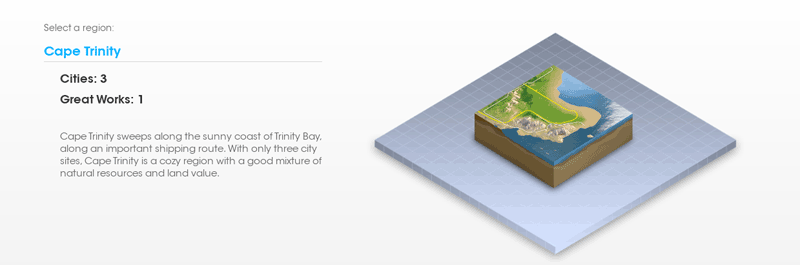
SimCity 310: Cape Trinity

AngelikMayhem's Difficulty Rating:
Deceptively Painful

The lore of the area is based around the fact that this is a small peninsular land mass that juts out into Trinity Lake. This region has been billed as being a very balanced level good for beginners, but I disagree. This is a great spot if you're good at specializing in oil, but the rest of the resources are fairly lacking: wind power is low across all three locations and there aren't really any other resource deposits of note.

I think the talk about how easy this one is derives from the fact that a) this was the region featured in all three beta tests, and b) two of the three city sites are flat as boards making them easy to zone. While both of those things are true -- and conducive to an easy start -- I would caution that if you plan on trying to climb the leaderboards, this region is not going to be your friend in the long run.


Cape Trinity (Clearwater is in the foreground)

City Sites

  • Clearwater
  • Norwich Hills
  • Trinity Point

Resources

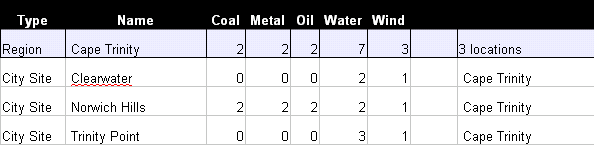
What we can see from the chart above (ratings provided by Maxis) is that Clearwater and Trinity Point have nothing to offer in terms of resources. This puts the full brunt of the extraction on Norwhich Hills -- giving that mayor a heavy burden but a clear path to prosperity. By digging up the coal and oil and turning them into power, you can help the other two cities balloon in size.

As a whole, the wind on this level is awful -- which makes me think that solar panels are going to be the end game here. All three cities should be prepared to carpet a corner with concentrated solar arrays. All three sites have a wind speed of 7 mph -- not conducive for long term growth. Further more, on closer inspection of the map of Norwhich Hills, the "2" ratings given by Maxis for coal and oil are very gracious indeed. Be mindful of how quickly those resources can run out.

A warning -- make sure you have a friend in Norwhich Hills, because an unscrupulous mayor might hang the other two cities out to dry.

City Site Size

These city sites are smaller than others, making them even harder. You must think carefully about how you want to lay these out and plan ahead for your specialization.

Advanced Strategy

This is one of the harder regions because there are only three city sites and they are spartan to say the least.

Trinity Point is surrounded by water, so this is going to be the spot to plop down some serious docks and trading centers. I think Clearwater is a great place to set up a university. Norwich Hills is your full on mining town and I would also use it to hold garbage and sewage. As long as all the mayors work together, you should be able to balance the deficits of each city site and create a nice trade network.

Recommended Specializations

  • All City Hall Modules: Clearwater
  • All Water Stuffs: Trinity Point
  • Industrial: Norwich Hills
  • [HQ] Education: Trinity Point
  • [HQ] Gambling: Norwich Hills
  • [HQ] Electronics: Clearwater
  • [HQ] Petroleum: Norwich Hills
  • [HQ] Metals: Norwich Hills
  • [S] Culture & Tourism: Trinity Point
  • [S] High-Denisty Commercial: Clearwater
  • [S] Waste & Sewage: Norwich Hills

Great Works (1)

There is only one great works site in this region. As a result, the decision over which great work to build is going to depend entirely on which direction you take your city sites. I would highly recommend discussing it at the beginning (if playing in a group) so that you are heading in a clear direction from the outset.

SimCity 306: Sunrunner Bay

AngelikMayhem's Difficulty Rating: Suicidal

This is the smallest of all the regions available in the game. It's also the most challenging and an absolutely unforgiving cesspool of doom. You've got almost no shot of turning this into a metropolitan area, so think about creating a resort town or richy-rich-getaway type of destination.

City Sites

  • Corsair Coast
  • Plunder Point

Resources

Here's what we know for a fact: Maxis' resource ratings indicate that there is not a single level 3 resource in either of these two city sites. In fact, if you add up all the resource points that this region has (15), that's only three more than the city state of Ceylon Steppes in Horizon Archipelago.

That means that no matter what you try to specialize in, you're going to run out of it -- quickly.

Wind is a level 1 for each site, so don't expect that to be your long-term solution. Any game played here is going to be about how quickly you can get to solar power and then build your city around your collector arrays.

Trying to set up a metal headquarters in a place like this is a futile effort. I would leave them where they are and try to go totally green on this one. However, if you insist on giving it a go, blast through coal, then oil, set up the solar collectors with whatever money you can scrape together, then focus on the metal. The oil in Plunder will run out first, so plan to retrofit that city site first.

City Site Size

Tiny, tiny, tiny.

Advanced Strategy

Imagine you're a hippy and you're setting up Woodstock. Or you're Lovey Howell and you're moving back to Gilligan's Island to set up a resort.

Recommended Specializations

  • All City Hall Modules: Corsair Coast
  • All Water Stuffs: Either
  • Industrial: Corsair Coast
  • [HQ] Education: Plunder Point
  • [HQ] Gambling: Corsair Coast
  • [HQ] Electronics: Plunder Point
  • [HQ] Petroleum: Corsair Coast
  • [HQ] Metals: Either Plunder Point
  • [S] Culture & Tourism: Plunder Point
  • [S] High-Denisty Commercial: Plunder Point
  • [S] Waste & Sewage: Corsair Coast

Great Works (1)

Good luck with this one. If you do, I would focus entirely on the airport -- the tourists will bring you vast amounts of revenue that you're not going to be able to generate by yourself.

SimCity 300: Regions

SimCity is divided into regions that you can experience with your friends. Some of these regions have very few city sites -- making them more challenging but less hectic -- and others have as many as sixteen city sites.

Each region has an in-game backstory that I don't think I need to repeat here, so instead I'll focus on my read based on how many resources are available and how much land is available for zoning.

Region: Cape Trinity

  • City Sites: 3
  • Great Works: 1
  • My Rating: Advanced

I've spent plenty of time with this one in the beta tests. Clearwater seems like the easiest site you could ask for given that it is perfectly flat and has almost no water, but looks can be deceiving. These three sites all have plenty of oil, but depend solely on Norwich Hills for the rest of their resources. One crummy mayor and the whole game is ruined. A tough one.

Region: Discovery Delta

  • City Sites: 16
  • Great Works: 4
  • My Rating: Beginner

Deltas appear at the end of rivers and so it makes sense that this region is mostly water with a large raging river cutting straight through the middle. Ironically, you're not supposed to build on deltas as they have a tendency to sink (there's no bedrock). That's why New Orleans is sinking and will be uninhabitable within the next century. But I digress. This region: easy and fun.

Region: Horizon Archipelago

  • City Sites: 11
  • Great Works: 3
  • My Rating: Beginner

Before you get all flustered, an archipelago is simply a collection of islands. In this case, it's three islands all connected with highways and rail. Pretty to look at and a great spot for beginners to cut their teeth, though only three great works sites means you have to make a tough choice later.

Region: Reflection Atoll

  • City Sites: 7
  • Great Works: 1
  • My Rating: Advanced

An atoll is an island with a lagoon. In real life, atolls are quite tiny. It's absurd to have seven "cities" crushed onto this thin strip of beach. I suspect the same logic is required to image that all seven castaways on Gilligan's Island remained celibate for fifteen years. Anyway, seven sites could be fun, if they weren't all waterlogged and severely lacking in resources. This is a serious challenge.

Region: Sunrunner Bay

  • City Sites: 2
  • Great Works: 1
  • My Rating: Suicidal

I can't imagine a more challenging level. The amount of resources is at an ultra-premium, the margin for error is razor thin, and you only have one great works site to boot. These are small, isolated, water-filled city sites that give you no room to screw around. I recommend this one for people who aren't looking to have fun -- but want to experience the searing pain of an aneurism without the paralysis.

Region: Titan Gorge

  • City Sites: 16
  • Great Works: 4
  • My Rating: Moderate

Minimal water in this one. But, what it lacks in agua it more than makes up for in resources and rail access.

Region: Veridian Woods

  • City Sites: 16
  • Great Works: 4
  • My Rating: Beginner

Veridian Woods has a little of everything and is a wide-open field where you and fifteen of your closest friends can have a ball. Multiple rivers, a thick, lush forest, and several opportunities for coast line make this a great place for beginners.

Region: Whitewater Valley

  • City Sites: 5
  • Great Works: 1
  • My Rating: Advanced

Whitewater Valley is actually quite small compared to some of the other regions. It has a t-bone shaped river system and a triple set of mountain clusters.